The Mushroom Journal logo

The Mushroom Journal is a cozy single-player game about collecting and documenting mushrooms in an original-art pixel environment inspired by the Finnish nature. Created as a professional project during my Game Production studies at JAMK University of Applied Sciences.

Welcome to Mush Meadows...

Begin your life anew as a forager in a humble village in the middle of lush forests. Away from the bustling city life, you shall rely on your trusty Mushroom Journal to help you make a cozy living. Can you learn to spot all the different mushrooms and get to know your curious neighbors?

My Contributions

Product Owner

I was responsible for defining the game concept and vision, managing the product backlog and making sure the game met its user needs.

Concepting

I created the core concept of the game based on my own personal experiences and interests in nature and cozy games.

UX Wireframing

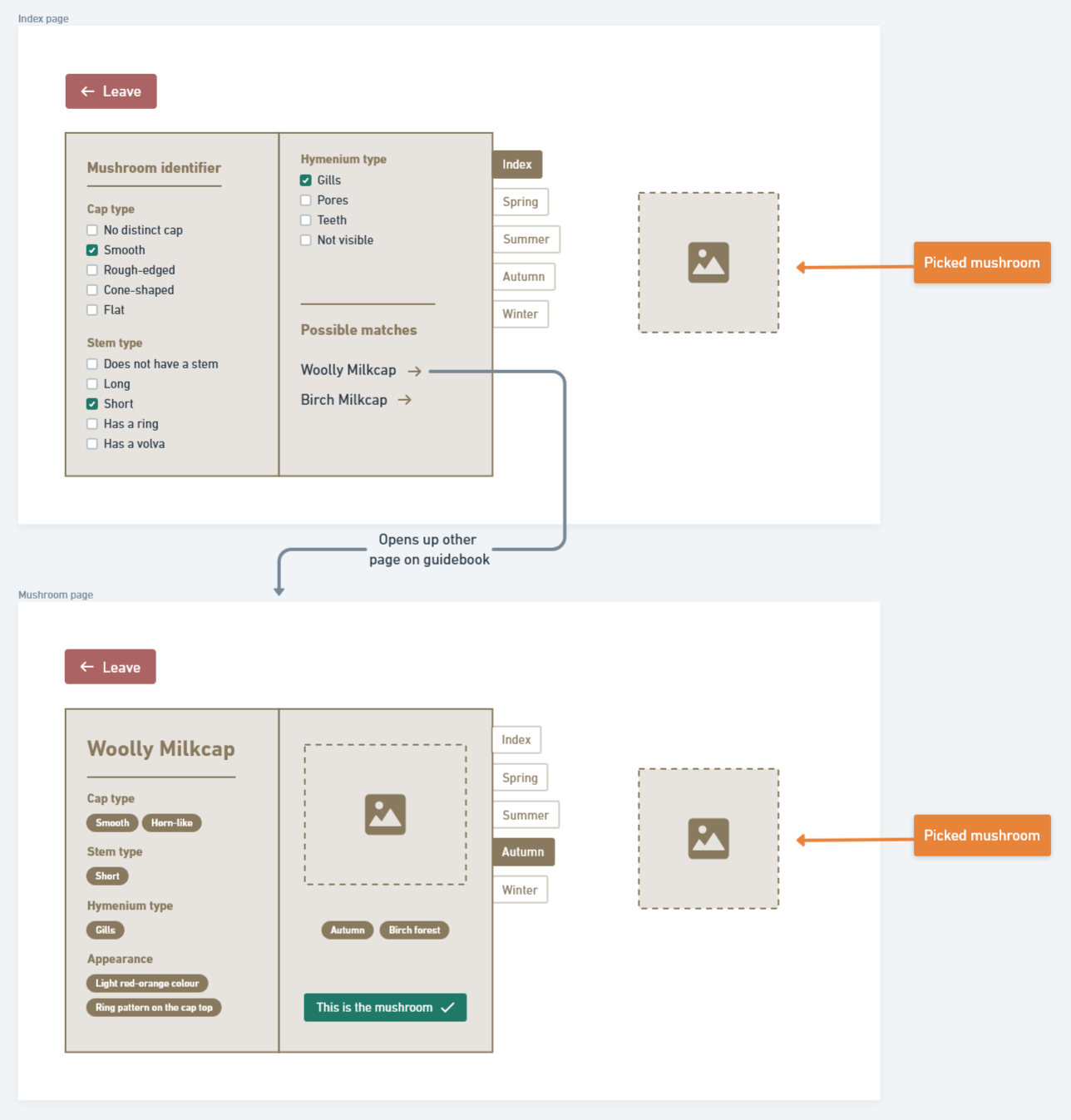
Helping the UI designer, I designed the initial UX wireframe for the main guidebook feature of the game.

Programming

I was the lead programmer for the core gameplay systems and UI components of the game, as well as in charge of file management and version control.

Business

I was responsible for the business development, creating pitch decks for different audiences and presenting them audiovisually.

UX Wireframing

UX wireframe of the main guidebook feature of the game

Modality

I designed the wireframe with the intention to keep most elements grouped together, making the design modal, meaning it is easier to cherry-pick parts of the design and move them around as groups. As I was not the sole designer, I made sure to document and communicate the design decisions clearly to ensure consistency across all iterations.

Consistency

Applying the Gestalt principle of cohesion, I made sure that all UI elements in the wireframe followed a consistent design language, using the same spacing, typography and visual hierarchy in each respective element group. Consistent design language helps the user understand the relationships between UI elements, therefore reducing the cognitive load while playing - a key aspect of a cozy game experience.

Readability

I ensured that all text in the wireframe was readable and legible, using appropriate font sizes and contrast ratios. Not only is the UX design easier to understand, but it also enhances the overall viewing experience by reducing eye strain and improving accessibility.

Business & Marketing

As part of the development team, I was responsible for the business development, pitching events and creating pitch decks for different audiences. In this role, I learned the importance of benchmarking, market research and user feedback in shaping the direction of a project.

While it was difficult to balance the needs of different stakeholders - the school project needs and the commercial needs of a potential publisher - I learned how to effectively communicate and negotiate with different audiences. A true help for this part of my learning journey was the pitching and business development sessions held by Dmytro Zhovtobryukh.

Final Pitch Deck

Programming

As the lead programmer, I was responsible for implementing core game mechanics and systems in Unity. As this project was my first major project in Unity, I learned a lot about the engine's architecture and how to structure code for maintainability and scalability. I struggled with managing the complexity of the codebase and ensuring that it was easy to maintain and extend, as the scope of the project grew - I luckily got help from senior developers who helped me extend my knowledge and skills in Unity development. A few of my key contributions include:

I created the MushroomData scriptable object for each type of mushroom for easy storing of information about the mushrooms. I learned how to use ScriptableObjects in Unity to store and manage data for different mushroom types, including their rarity, spawn locations, and visual properties. In addition to the execution of code, I learned more about the Unity Engine and how to format the Inspector window to display the data in a user-friendly way. Adding headers and descriptions to the Inspector window made it easier for the artists and game designers to also understand and modify the data, making my workload lighter for implementation tasks.

using UnityEngine;

// mushroom rarity levels enumeration
public enum Rarity { Common = 1, Uncommon = 2, Rare = 3, Epic = 4, Legendary = 5 }

// different locations where mushrooms can spawn
public enum SpawnLocation { DryWoods, WetWoods, FallenTree, Clearing, Meadow, Swamp, Cave, BirchTrees, SpruceTrees, Chanterelle }

// seasons affecting mushroom spawning
public enum Season { Spring, Summer, Fall, Winter }
 
public enum CapType { None, RoughEdged, SmoothEdged, ConeShaped, Flat, OvalLike }
public enum GillType { Gills, Pores, Teeth, Smooth }
public enum StemType { Long, Short, Volva, Ring }

[CreateAssetMenu(menuName = "Mushrooms/New Mushroom")]
public class MushroomData : ScriptableObject
{
    [Header("General Info")]
    public string mushroomName;
    public string mushroomScientificName;

    [TextArea]
    [Tooltip("What to show in the guide book entry for this mushroom. \"This mushroom is this and that\"")]
    public string mushroomInfo;
    [TextArea]
    [Tooltip("What to show in the checklist entry for the mushroom. \"This mushroom is this and that\"")]
    public string mushroomShortInfo;

    [Header("Sprites")]
    public Sprite worldSprite;   // shown in the world map
    public Sprite displaySprite; // shown in checklist page UI
    public Sprite sketchSprite;  // shown in mushroom page UI

    [Header("Properties")]
    public bool isEdible;
    public bool isPoisonous;

    [Header("Identification Traits")]
    public CapType[] capTraits;
    public GillType[] gillTraits;
    public StemType[] stemTraits;

    [Header("Economy Settings")]
    public int marketValue;
    // public int penaltyValue;
    public int blackMarketValue;

    [Header("Spawn Settings")]
    public Rarity rarity = Rarity.Common;   // controls how rare this mushroom is
    public SpawnLocation[] spawnLocations;  // locations where this mushroom can spawn
    public Season[] spawnSeasons;           // seasons when this mushroom can spawn
}

I created the logic for spawning mushrooms in the game. The spawner is responsible for placing mushrooms in specific locations based on the current season and location type. The spawner uses a function, ChooseMushroom, to create a weighted list of spawning candidate mushrooms based on rarity, and the list is then used to select a random mushroom for the specific spawn point. Each spawn point has its own spawn location and spawn chance percentage that affects the spawning probability.

using System.Collections.Generic;
using UnityEngine;

public class MushroomSpawner : MonoBehaviour
{
    [Header("Spawner Settings")]
    public GameObject mushroomPrefab; // prefab for the mushroom with MushroomInteractable and SpriteRenderer
    public MushroomData[] allMushrooms; // array of all possible mushroom types
    public Transform[] spawnPoints; // points where mushrooms can spawn

    void Start()
    {
        SpawnMushrooms();
    }

    void SpawnMushrooms()
    {
        Debug.Log("Spawner running at " + gameObject.name);

        Season currentSeason = GameManager.Instance.currentSeason; // get current season from GameManager

        foreach (Transform point in spawnPoints)
        {
            SpawnPoint sp = point.GetComponent<SpawnPoint>();
            if (sp == null) continue; // ensure the spawn point has a SpawnPoint component

            if (Random.value <= sp.spawnChance) // check spawn chance from SpawnPoint
            {
                // loop through all locationTypes for this spawn point
                foreach (var locationType in sp.locationTypes)
                {
                    MushroomData chosenData = ChooseMushroom(locationType, currentSeason); // pass each location type
                    if (chosenData != null)
                    {
                        GameObject mushroom = Instantiate(mushroomPrefab, point.position, Quaternion.identity); // spawn the mushroom
                        MushroomInteractable interactable = mushroom.GetComponent<MushroomInteractable>(); // assign data to the interactable

                        if (interactable != null)
                            interactable.data = chosenData; // assign the chosen mushroom data

                        SpriteRenderer sr = mushroom.GetComponent<SpriteRenderer>(); // set the sprite
                        if (sr != null)
                            sr.sprite = chosenData.worldSprite;
                        break; // spawn only one mushroom per spawn point
                    }
                }
            }
        }
    }

    MushroomData ChooseMushroom(SpawnLocation location, Season season)
    {
        List<MushroomData> candidates = new List<MushroomData>();

        foreach (MushroomData data in allMushrooms) // filter mushrooms based on location, season, and rarity
        {
            bool validLocation = System.Array.Exists(data.spawnLocations, l => l == location);
            bool validSeason = System.Array.Exists(data.spawnSeasons, s => s == season);

            if (validLocation && validSeason)
            {
                int weight = (int)Rarity.Legendary + 1 - (int)data.rarity;
                for (int i = 0; i < weight; i++) // add multiple entries for higher rarity (the weighted list thingy)
                    candidates.Add(data);
            }
        }

        if (candidates.Count == 0) return null;

        int index = Random.Range(0, candidates.Count);
        return candidates[index]; // return a random mushroom [index] from the weighted candidates
    }
}

using UnityEngine;
using System.Collections.Generic;

public class SpawnPoint : MonoBehaviour
{
    [SerializeField]
    public List<SpawnLocation> locationTypes = new List<SpawnLocation>(); // types of locations this spawn point can represent
    [Range(0f, 1f)] public float spawnChance = 0.5f; // chance of spawning a mushroom at this point
}

The UIManager handles the main functionalities' UI functionalities, such as populating the inspection panel's checklists, handling what Pick and Leave buttons do, as well as displaying basket and warning texts on the screen.

using UnityEngine;
using UnityEngine.UI;
using TMPro;

public class UIManager : MonoBehaviour
{
    public static UIManager Instance;

    [Header("Inspection UI")]
    public GameObject inspectionPanel;
    public Image displayImage;
    public GuidebookUI guidebookUI;

    [Header("Checklist Sections")]
    public GameObject capSection;
    public GameObject gillsSection;
    public GameObject stemSection;

    [Header("Inventory UI")]
    public TextMeshProUGUI basketCountText; // Basket count display

    private GameObject currentMushroomObject;
    private MushroomData currentMushroomData;
    [SerializeField] private PlayerController playerController;
    public TextMeshProUGUI warningText;

    void Awake()
    {
        if (Instance == null) Instance = this;
        else Destroy(gameObject);

        if (playerController == null)
        {
            playerController = FindFirstObjectByType<PlayerController>();   // find player controller in scene if not assigned
        }
    }

    public void OpenInspection(MushroomData data, GameObject mushroomObject)
    {
        if (data == null)
        {
            Debug.LogError("UIManager.OpenInspection: data is null!");
            return;
        }

        currentMushroomData = data;
        currentMushroomObject = mushroomObject;

        if (displayImage != null && data.displaySprite != null)
            displayImage.sprite = data.displaySprite;

        inspectionPanel.SetActive(true);

        PopulateChecklist(capSection, currentMushroomData.capTraits);
        PopulateChecklist(gillsSection, currentMushroomData.gillTraits);
        PopulateChecklist(stemSection, currentMushroomData.stemTraits);

        guidebookUI.SetupGuidebook(data);
    }

    public void OnPickButton()
    {
        if (currentMushroomObject == null || currentMushroomData == null)
        {
            CloseInspection();
            return;
        }

        if (!guidebookUI.IsSureMushroomIs(currentMushroomData))
        {
            guidebookUI.ShowUnsureMessage();
            currentMushroomObject.GetComponent<MushroomInteractable>().Interactable = false;
            return;
        }

        // if correct, increment identification count (insta-pick feature)
        GameManager.Instance.playerData.IncrementIdentification(currentMushroomData.mushroomName);

        bool picked = true;
        if (InventoryManager.Instance != null)
        {
            picked = InventoryManager.Instance.AddMushroom(currentMushroomData);
        }

        if (!picked)
        {
            return;
        }

        Destroy(currentMushroomObject);
        CloseInspection();
    }

    public void OnLeaveButton() => CloseInspection();

    private void CloseInspection()
    {
        currentMushroomObject = null;
        currentMushroomData = null;
        inspectionPanel.SetActive(false);

        PlayerController.CanMove = true; // re-enable player movement
    }

    private void PopulateChecklist<T>(GameObject section, T[] traits) where T : System.Enum
    {
        foreach (Toggle toggle in section.GetComponentsInChildren<Toggle>())
        {
            TMP_Text label = toggle.GetComponentInChildren<TMP_Text>();
            if (label != null)
            {
                toggle.isOn = System.Array.Exists(traits, trait => trait.ToString() == label.text); // match trait to toggle label
            }
        }
    }
}

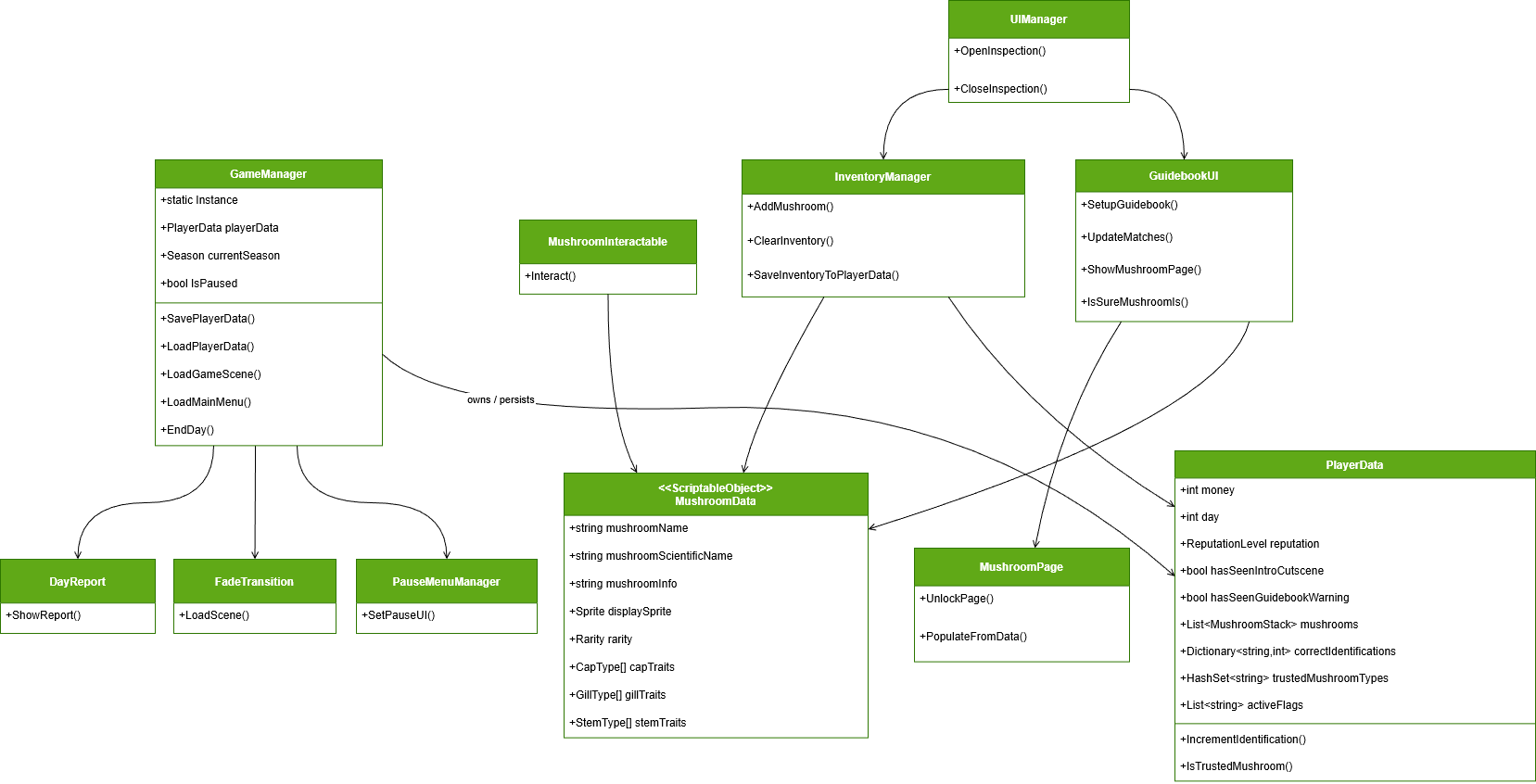
I learned how to create a class diagram for The Mushroom Journal's game systems, which helped me visualize the relationships between different components and their responsibilities. The key takeaway was understanding how to map out dependencies and responsibilities in a game system - which turned out a lot more complex than I initially thought. This class chart does not fully represent all the relationships in the game (nor does it include the outsourced code), but it was a good starting point for understanding the architecture.

Class diagram for The Mushroom Journal

Key Learning Outcomes

In my role as a programmer, I...

In my role as an implementation responsible, I...

In my role as a business responsible, I...

Get the Game

You can get The Mushroom Journal for free on Steam!

MageBerry Logo